Showing posts with label Windows Internet Explorer 8. Show all posts

Showing posts with label Windows Internet Explorer 8. Show all posts

First look at Microsoft IE 8 RC1 and Download Link

First Look – Microsoft quietly released the first update to its IE8 beta 2 to its closest partners last week. This new version is marked as “Release Candidate 1” and is expected to be the final IE8 pre-release update Microsoft intends to make available to the public sometime in the first quarter of 2009. TG Daily was able to take the browser for a first spin: We noticed that Microsoft made significant progress in some areas, but is standing still others. RC1, which is believed to be the first feature-complete version of the browser, will not match the JavaScript performance of all other major browsers.

ie8rclogo

The first update to Microsoft’s browser since IE 8 beta 2 was released to select Microsoft partners for testing last Wednesday. The company indicated in recent blog posts that it was delaying the browser for some time and that it may have a good reason to do so. A final public and feature-complete pre-release would become available in Q1 2009 and, of course, we were curious what may have canceled a 2008 release of the browser.

Will Microsoft shelve the browser engine? Will Microsoft follow through with its promise to make its browser much more compliant with web standards than previous versions were? We were lucky enough to get an early look at this final pre-release and now have a good idea how IE8 will look like. But, since this software is a partner release, it is more than likely that Microsoft will make one or the other change based on feedback until a public RC1 will surface. However, significant changes are rather unlikely.

Let’s cut to the chase right away…….read more @ source

Download Link:

Download Windows Internet Explorer 8 Release Candidate 1 for Windows Vista 32-bit
Download Windows Internet Explorer 8 Release Candidate 1 for Windows Vista 64-bit
Download Windows Internet Explorer 8 Release Candidate 1 for Windows 2003 and XP 32-bit
Download Windows Internet Explorer 8 Release Candidate 1 for Windows 2003 and XP 64-bit
Download Windows Internet Explorer 8 Release Candidate 1 Readme file

Add Your Favorite Program Shortcut in IE 8 toolbar

Posted on Sept 7, 2008

 
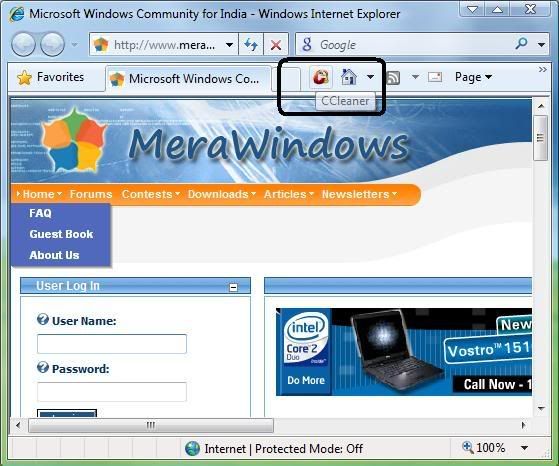
This tutorial will show you how to add your favorite program shortcut in IE 7/ IE 8 toolbar. You can add any program you want. In our example we will be using CCleaner which can be used for removing cookies, url history, temporary internet files, recent typed url's etc. etc.
  
Here's how you can do this>>>
 
  • First install CCleaner.
  • Download CCleaner icon from here.
  • Extract the zip archive to a folder on your hdd.
  • Move the ccleaner_app.ico from the folder to your CCleaner installation directory( which is normally C:\Program Files\CCleaner\).
  • Click on Start button, type regedit in the search box and hit Enter.
  • In Registry Editor, navigate to HKEY_CURRENT_USER\Software\Microsoft\Internet Explorer\.
  • Right-click on Internet Explorer, select Key from New menu and type Extensions.
  • Again right-click on Extensions, select Key from New menu and type {7A8B2368-E336-49c5-A762-0FF3E7E09DDE}.
  • Select this Key and move into the right pane. Here we will create some strings as given in the screenshot below with their respective names and values.

 
  • Close the Registry Editor.
  • Open Internet Explorer and see if you got the CCleaner icon in the toolbar as given in the screenshot below:


If you can not see it on the toolbar, you can get it by customizing the toolbar.

IE8 Beta 2: Great new features, old annoyances

 Posted on Aug 28, 2008
 
Image 


Useful new features

It is obvious that Microsoft’s IE engineers had some innovation pressure from some management levels above and there are, in fact, a few interesting features. First, there is finally a “Find on this Page” feature you can actually use, since it is placed in its own field below the address bar. Searching web pages for certain words or phrases is also enhanced through search result highlighting and search result count.

Just like Firefox, IE8 can also store a browsing session and reopen it when the software is restarted.

The “Smart Address Bar, which offers a neatly structured, instant search feature when you are entering a URL, is also new. Similar to the Firefox idea, the Address options are very organized, easy to read and in most cases actually useful – especially when you are looking for a certain section on a website and simply don’t know its sub-level address.

The best new feature, hands down, is Tab grouping. At least I tend to have countless tabs open and once you exceed ten or more tabs, it gets confusing and you have to start reorganizing those tabs. IE8 does that for you in a color-coded fashion. The colors themselves are a matter of taste, but as long as you are opening tabs through the context menu (right mouse click), a new tab will appear in the color of the originating website. This feature is a perfect example how simple ideas can have a huge impact.

Tabs now also come with “crash recovery”, which means that the content in a tabbed window is automatically restored and reloaded - and any information the user may have already entered on the page (such as when writing an e-mail or filling out a form) is restored.

Under the hood, there are new features you won’t see in the user interface - which, however, are milestones for Microsoft. First, the browser is much closer to common web standards than any other version before (Microsoft says it passes the Acid2 browser test), CSS 2.1 will be implemented in the final version of the browser, there are Document object model (DOM) and HTML 4.01 improvements and there is support for W3C’s HTML 5 Draft DOM Storage standard and the Web API Working Group’s Selectors API.


Useless new features    

Microsoft would not be Microsoft if there wasn’t an overload of features that in fact make the browser (12.7 MB download) appear bulky. Each user may have a different opinion what these features may be, but at least in this version it seems to be Microsoft’s Web Slices and Accelerators (renamed from “Activities”). On one side, Microsoft promises to stay within general HTML guidelines and on the other the company cannot resist to create proprietary features that are not part of any standard and are not supported by any other browser. Is it just me or does this sound strange?

Both Web Slices (a way to subscribe to certain content) and Accelerators (quick access to maps, for example) are obviously a try to standardize certain features and convince web developers and other browser developers to adopt this functionality. To me, both features are nice and may be certainly useful in some cases, but will they improve your browsing experience in general? No. In some scenarios, IE8 feels too heavy. The browser interface clearly needs another workout to trim some of the fat it has gained over the years. 


Old Microsoft habits


The installation process of the browser remains unacceptable and one big annoyance. Even on my relatively speedy PC, the installation process took 28 minutes from beginning to end. For 17 minutes, the PC was unusable, since the PC needs to be restarted and updates need to be reconfigured.

Why is it that Firefox can be downloaded and installed on the go without the need for a restart of the PC and Microsoft takes my PC hostage for 17 minutes for a simple browser update? I may be picky here, but iE8 is not particularly convenient (and transparent) to install. (this is the worst thing for me)

You can download IE8 Beta 2 here.

Read Full Artile Here (it's a must read)